
Previously, connecting OpenAI WhatsApp was a novelty. Now, it’s a business decision with clear rules and more options in the market. Meta changed the conditions for WhatsApp Business, OpenAI updated its models, and support platforms have shifted from chatbots to AI agents.
This guide explains what a company needs before connecting OpenAI WhatsApp, how to connect them, how to write agent instructions, current costs, when AI is necessary, and what trends are emerging for 2027.
What a Company Needs Before Connecting OpenAI WhatsApp
Here are 6 steps to achieve it:
- Understand Meta’s requirements: Since January 15, 2026, WhatsApp Business prohibits general-purpose AI assistants, like ChatGPT, that operate as open services. What is allowed is for a company to use AI to serve its own customers: Answering questions, scheduling appointments, tracking orders, or providing support. In practice, connecting WhatsApp to OpenAI means creating a business agent with a specific job, not just any tool that responds in any way.
- A WhatsApp Business number connected via official API: Callbell is an official provider of the WhatsApp Business API, so agents operate within Meta’s verified ecosystem Meta.
- A clear objective for the agent: Assign clear foundations with the company’s real information and what you really need the Agent to answer: Assist with questions, qualify interested leads, schedule appointments, update the CRM with customer data, converse naturally for better flow but without over-answering. An agent that tries to help with everything often fails.
- Accurate and organized information: Prices, schedules, shipping policies, warranties, and FAQs. The AI responds only as well as the information stored in the tool.
- A person in charge of supervision: Someone must review conversations, correct errors, and periodically update the information to modify and analyze the tool’s behavior.
- Rules about what the agent must not do: For example, giving unauthorized discounts, promising dates it can’t control, or giving opinions on legal matters. (All of this must be assigned to the agent)
Step by Step: Connect OpenAI WhatsApp with Callbell
With the launch of Callbell AI Agents, it’s no longer necessary to build everything with manual logic or handle technical keys.
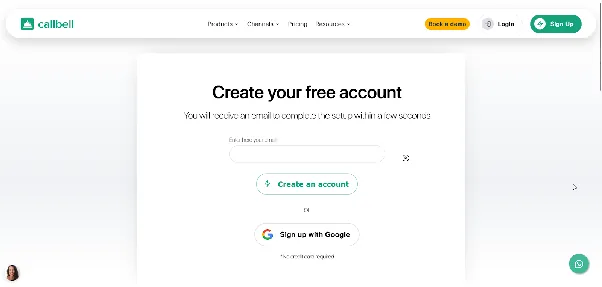
- Create a Callbell account at https://www.callbell.eu
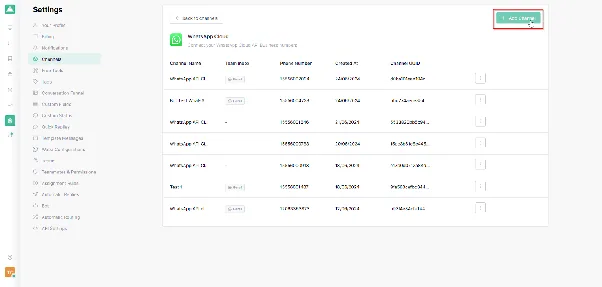
- Add a WhatsApp number as a messaging channel
Next, in the Flows option, create a Chatbot in the account and configure it
Then create a string-type variable and enter the OpenAI API.
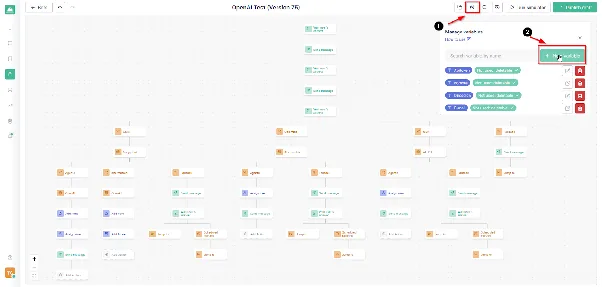
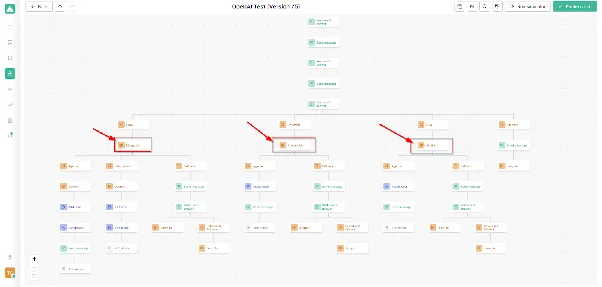
- Next, in the chatbot, locate the place within the flow where you want OpenAI to start serving customers.
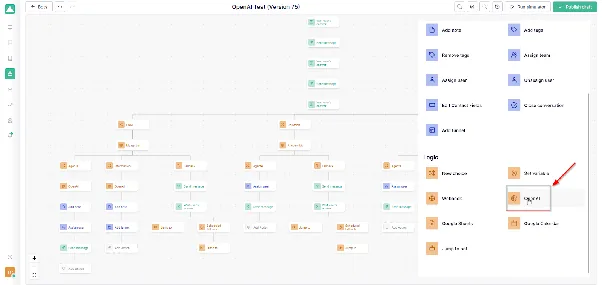
- Wherever you want to place the artificial intelligence, create an OpenAI-type logic.
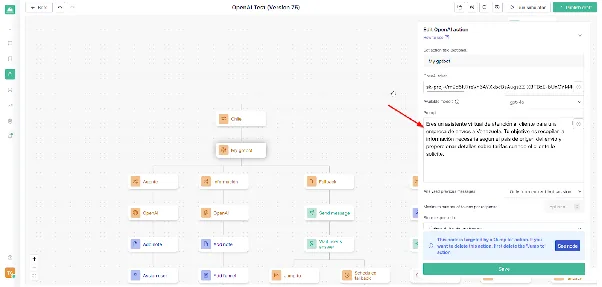
- Add a prompt to this logic, configuring the conversation analysis mode and the AI model to use.
- Finally, test the chatbot before implementing it in operations.
Here’s an explanatory video to connect OpenAI WhatsApp with Callbell
Given this, it’s clear that the connection is simple and in this way you can respond to customers automatically with a personalized AI agent as needed.
A complete journey looks like this:
Customer writes → Bot greets and asks the reason → AI agent responds → Goal achieved: labeled and closed → Requested human: assigned to the correct team → No response: automatic reminder → Error: assigned to the team with an internal note
How to Write Agent Instructions Correctly
Instructions are the part that most influences service quality. A clear template has six parts:
- Who it is: “This is the virtual assistant of [company], offering [product or service].”
- Purpose: “Its goal is to answer frequent questions and schedule appointments.”
- How it speaks: “Uses a friendly, clear, and respectful tone. Short messages without technical jargon.”
- What it knows: “Responds only with information from the knowledge base.”
- What it never does: “Does not invent prices or promises. Does not give medical, legal, or financial advice. Does not negotiate discounts.”
- When to transfer to a human: “If the customer is upset, asks to speak to someone, makes a complaint, or the query is not in the knowledge base.”
Important: If the information is not in the knowledge base, the agent must say it will consult with the team instead of making something up. This instruction protects the brand more than any other.
How Much Does It Cost to Connect WhatsApp to OpenAI
An AI operation on WhatsApp has three separate costs:
- Meta: Charges per delivered message, depending on the message type and the customer’s country.
- The platform: The Callbell plan.
- The AI: Depends on the agent’s credit consumption.
What changed on October 1, 2026, in Meta’s costs
| Message Type | Until Sept 30, 2026 | From Oct 1, 2026 |
|---|---|---|
| Free response within 24h window (service) | Free | First 1,000 per number each month are free; after that, charges apply |
| Utility template within 24h window | Free | Charged |
| Utility template outside the window | Charged | Charged |
| Marketing and authentication | Charged | Charged |
A valuable exception remains: When a customer writes from a click-to-WhatsApp ad or from the WhatsApp button on a Facebook page, and the company responds within 24 hours, a 72-hour window opens in which all messages are free.
Rates vary by country, so it’s advisable to check the official Meta table before budgeting.
What this means for an AI agent
If each customer exchanges 12 messages, an operation with thousands of conversations per month will easily exceed the free quota. Here are some ways to control spending:
- Request complete and concise answers, instead of several consecutive messages. Buttons can be used to reduce back and forth.
- Resolve very frequent questions with simple automatic responses, without AI.
- Take advantage of the free 72-hour window with click-to-WhatsApp ads.
- Review each month which conversations consumed the most and why.
What’s Coming in 2027 if You Want to Connect WhatsApp to OpenAI
No one can guarantee the future, but the signals from 2026 point to 5 trends that companies can already prepare for.
- From chatbots to agents that act. An agent that only responds falls short. The next step is for it to check inventories, create orders, schedule in calendars, and update the CRM without help. Gartner projects that by 2029, AI agents will autonomously resolve a large portion of common customer service issues.
- Commerce within the conversation. More and more purchases start and finish in chat. The evolution of conversational AI is not limited to answering questions or automating customer service. It is also opening the possibility for AI agents to participate in purchase and payment processes.
Entities like Visa and Mastercard are working on protocols and security mechanisms that allow verification of agent identity, protection of payment credentials, and setting limits on transactions they can perform. - Customers arriving through other AI assistants. Some consultancies project that by 2027, a significant portion of digital interactions will start within AI assistants and not on the company website. If this comes true, company information will have to be organized, updated, and consistent so those assistants can understand and recommend it.
- Voice and calls via WhatsApp. Voice agents for WhatsApp are already being tested. Support could combine text, voice notes, and calls with the same agent.
- More control and more rules. Meta has already shown it adjusts conditions as usage changes. It’s reasonable to expect new rules on transparency and consent. Companies already working with approved templates, clear consent, and human handoff will be better positioned. Callbell is the most ideal option for this process
How to prepare starting today:
- Organize and update company information in one place.
- Connect the agent with a real system, like the CRM, before thinking about more complex things.
- Measure results every month to make data-driven decisions.
- Always keep a door open to a team member
Differences Between Callbell and Meta’s Native Agent
On June 3, 2026, Meta launched Meta Business Agent, an artificial intelligence solution to respond to customers, recommend products, qualify leads, and support sales processes in its apps. Its initial setup is free, although Meta announced it would offer paid plans.
The choice between Meta’s native agent and a platform like Callbell depends on the channels your company uses, the level of customization you need, and the complexity of your support and sales processes.
| Criteria | Meta Business Agent | Callbell |
|---|---|---|
| Main objective | Automate support and assist sales within the Meta ecosystem. | Centralize conversations and coordinate support, sales, and automations from a single platform. |
| Communication channels | WhatsApp, Instagram, and Messenger, depending on feature availability for each account. | WhatsApp, Instagram, Facebook Messenger, Telegram, TikTok, and web chat. |
| Configuration | Allows you to get started quickly from Meta’s business tools. | Allows you to configure channels, teams, chatbots, and automations according to business needs. |
| AI responses | Answers questions about the business, recommends products, and can help qualify leads and close sales. | Allows you to implement AI agents with a knowledge base and configure automations to handle queries and support business processes. |
| Customization | Can adapt responses to the business tone and leverage conversation context. Meta’s platform also offers more advanced customization and integration options. | Allows you to combine AI agents, chatbots, and conversation flows to adapt support to company processes. |
| Contact and CRM management | Can connect with business systems via Meta Business Agent Platform, depending on configuration and available integrations. | Includes a CRM to organize contacts and support commercial follow-up. |
| Team management | Allows you to define when a person should intervene. Coordination options depend on the tools and plan used. | Centralizes conversations in a shared inbox and allows assignment to agents or teams for organized support. Also allows a person to intervene when necessary |
| Integrations | Meta Business Agent Platform allows connection with compatible business systems, such as e-commerce and customer service platforms. | Offers API and webhooks to connect the platform with compatible external systems, such as CRM and ERP. |
| Process control | An alternative to automate interactions within the Meta ecosystem, with more advanced options through its business platform. | Facilitates coordination of conversations, assignment of responsibilities, and activity tracking from a single environment. |
| What type of company is it best suited for? | Businesses looking to quickly start with AI on Meta channels and whose needs can be met with its available features. | Companies with sales or support teams that need to centralize multiple channels, organize contacts, and coordinate support and follow-up processes. |
An honest opinion: There is no single best tool for everyone. The right one is the one that fits the team size, message volume, and the systems the company already uses. When comparing any platform, it’s worth checking five points:
- If it uses the official API
- If it allows transfer to a human agent
- If the CRM can be integrated
- How the AI charges
- If it offers a simulator to test before going live.
Conclusion
Connecting WhatsApp to OpenAI is no longer an experiment. Today it’s a concrete way to respond faster, organize team work, and not miss opportunities due to silence. The safest path is to start small: one agent, one objective, organized information, real tests, and an open door to a human. With that foundation, adding sales, appointments, or payments within the chat is a natural step toward what’s coming in 2027.
 The authorAlan TrovòMarketing manager at Callbell, the platform that helps sales and support teams talk to customers via WhatsApp, Messenger, Telegram and Instagram Direct.
 Use Google